WELCOME TO THE
TRĒ KNOWLEDGE CENTER
How can we help?
How can we help?
Search the Knowledge Center…

TRĒMail
On this page
Campaign creation
Templates
View and test
Select list
Schedule campaign
Open boost
Reporting
Embed list selection in webpages
TRĒMail metrics in contact records
TRĒmail is a powerful and intuitive eMarketing solution that transforms current, enhanced, and laser-precision lists built in TRĒ AI into highly effective eCampaigns.

CAMPAIGN CREATION
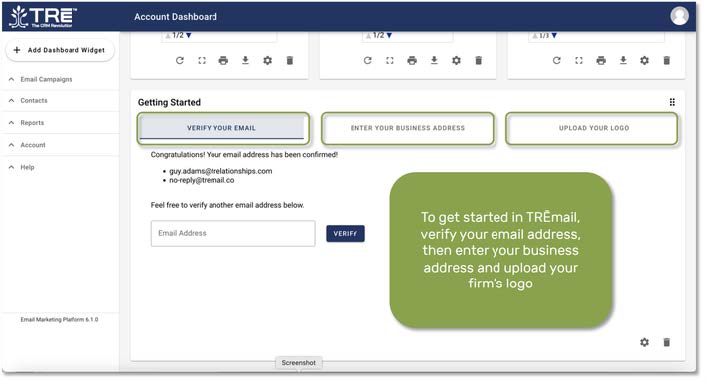
Getting started with TRĒmail. To get startedin TRĒmail, verifyyour email address,then enter your business address and upload your firm’s logo
Click the Email Campaign stab.
“+ New Email Campaigns” button will appear. Click it to build a campaign.

Next, name your campaign. Click the EmailReport toggle if you want to receive a report detailing the results of your campaign. Then click SAVE AND CONTINUE

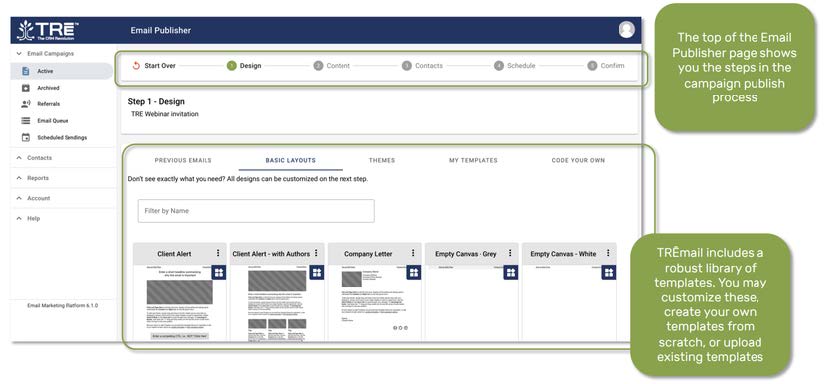
The top of the Email Publisher page shows you the steps in the campaign publish process.
TRĒmail includes a robust library of templates. You may customize these, create your own templates from scratch, or upload existing templates.
TEMPLATES
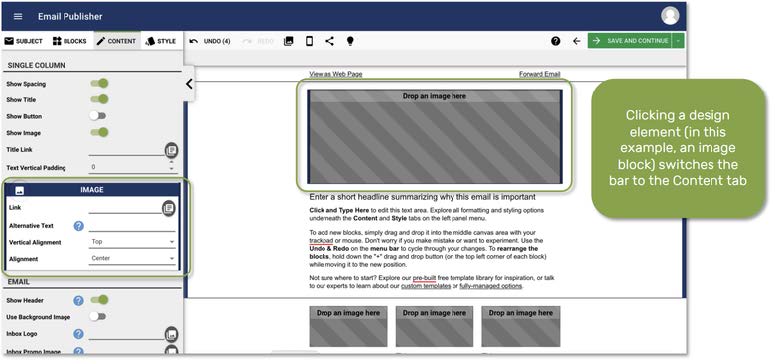
When you select a template, you are taken to the email studio:

Clicking a design element(in this example,an image block)switches the bar to the Content tab
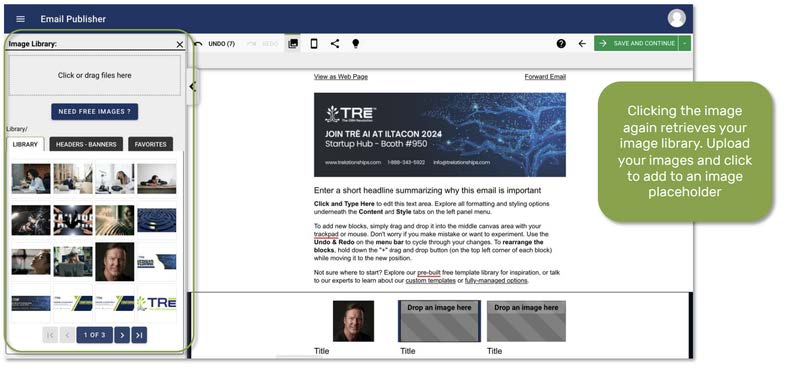
Clicking the image again retrieves your image library. Upload your images and click to add to an image placeholder. Edit the content in your mailer, then click the green SAVE AND CONTINUE button in the upper right hand corner
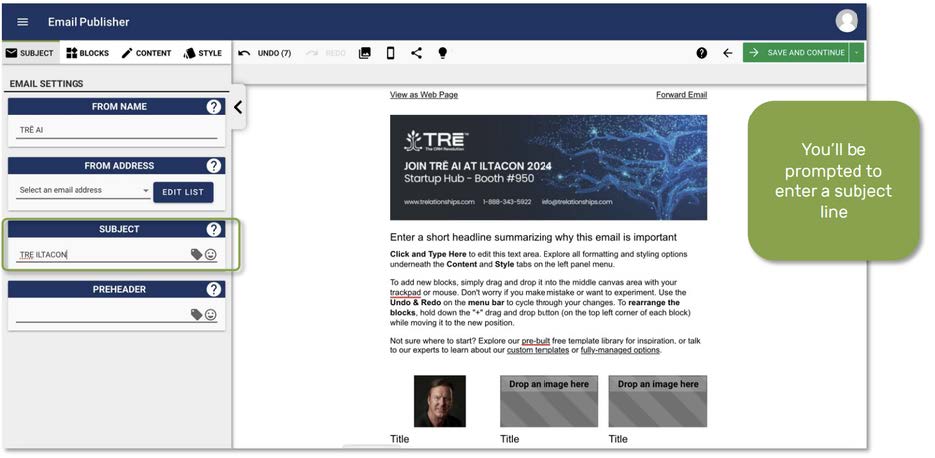
You’ll be prompted to enter a subject line
VIEW AND TEST
If you like, you can review and test your mailer on a variety of clients, platforms, and social media

Clicking the Test tab displays your mailer on dozens of different clientsand platforms. TRĒmail also includes a built-in spam checker

SELECT LIST
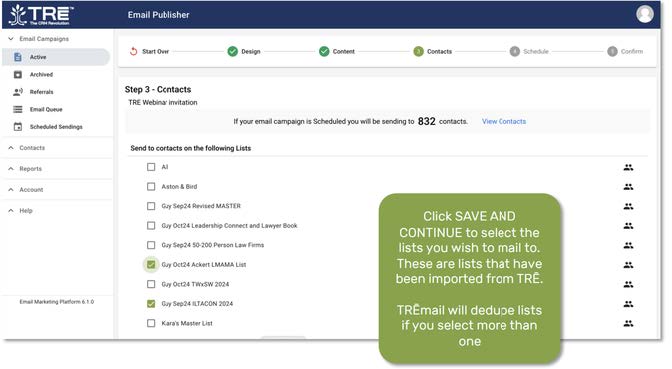
Click SAVE AND CONTINUE to select the lists you wish to mail to. These are lists that have been imported from TRĒ AI.
TRĒmail will dedupe lists if you select more than one
SCHEDULE
You may now either send your mailer now, schedule for a future date and time, or create a recurring mailer.

OPEN BOOST
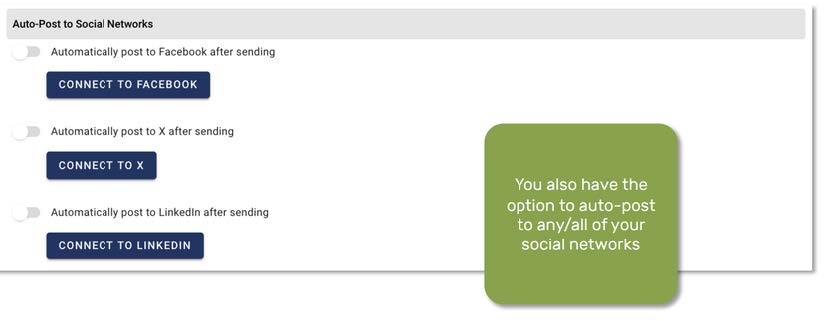
TRĒmail’s OpenBoost feature gives you the option to automatically resend to recipients who have not opened your mailer. You also have the option to auto-post to any/all of your social networks
REPORTING
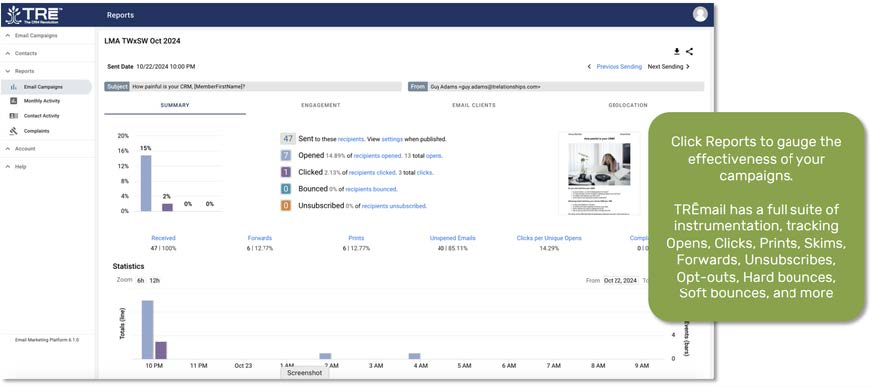
Click Reports to gauge the effectiveness of your campaigns. TRĒmail has a full suite of instrumentation, trackingOpens, Clicks, Prints,Skims, Forwards, Unsubscribes, Opt-outs, Hard bounces, Soft bounces, and more!
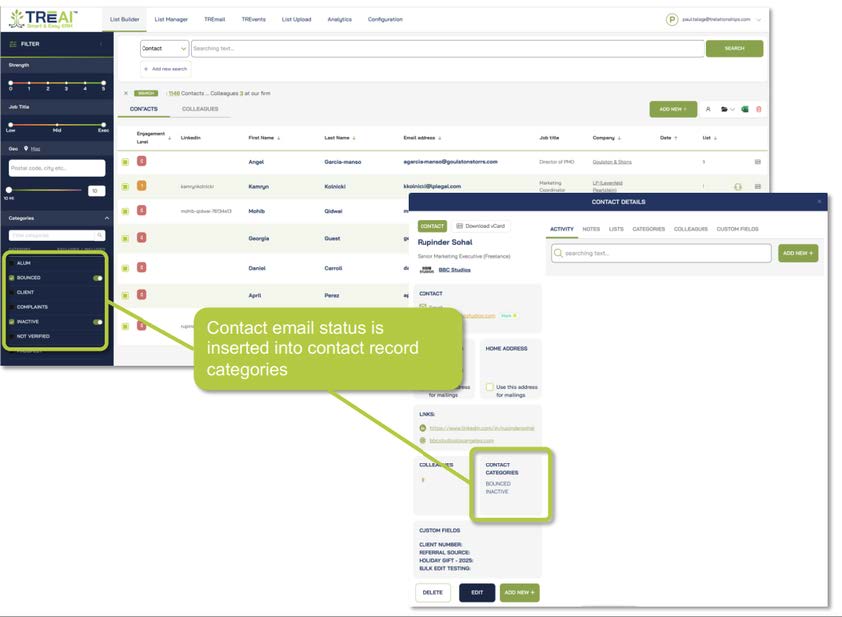
Contact email status is inserted into contact record categories, enabling you to easily see contacts that have bounced, subscribed, or unsubscribed


Copyright 2026 TRĒ AI, Inc. All rights reserved.
“TRĒ”, “TRĒ Effect”, “TRĒ AI”, and the TRĒ tree logos are trademarks of TRĒ AI, Inc.
Copyright 2026 TRĒ AI, Inc. All rights reserved.
“TRĒ”, “TRĒ Effect”, “TRĒ AI”, and the TRĒ tree logos are trademarks of TRĒ AI, Inc.
Copyright 2026 TRĒ AI, Inc. All rights reserved.
“TRĒ”, “TRĒ Effect”, “TRĒ AI”, and the TRĒ tree logos are trademarks of TRĒ AI, Inc.
WELCOME TO THE
TRĒ KNOWLEDGE CENTER
How can we help?
Search the Knowledge Center…
On this page
Campaign creation
Templates
View and test
Select list
Schedule campaign
Open boost
7. Reporting
Embed list selection in webpages
TRĒMail metrics in contact records
TRĒmail is a powerful and intuitive eMarketing solution that transforms current, enhanced, and laser-precision lists built in TRĒ AI into highly effective eCampaigns.
CAMPAIGN CREATION
Getting started with TRĒmail. To get started in TRĒmail, verify your email address, then enter your business address and upload your firm’s logo
Click the Email Campaigns tab.
“+ New Email Campaigns” button will appear. Click it to build a campaign.
Next, name your campaign. Click the EmailReport toggle if you want to receive a report detailing the results of your campaign. Then click SAVE AND CONTINUE
The top of the Email Publisher page shows you the steps in the campaign publish process.
TRĒmail includes a robustlibrary of templates. You may customize these, create your own templates from scratch, or upload existing templates.
TEMPLATES
When you select a template, you are taken to the email studio:
Clicking a design element(in this example,an image block)switches the bar to the Content tab
Clicking the image again retrieves your image library. Upload your images and click to add to an image placeholder. Edit the content in your mailer, then click the green SAVE AND CONTINUE button in the upper right hand corner
You’ll be prompted to enter a subject line
VIEW AND TEST
If you like, you can review and test your mailer on a variety of clients, platforms, and social media
Clicking the Test tab displays your mailer on dozens of different clientsand platforms. TRĒmail also includes a built-in spam checker
SELECT LIST
Click SAVE AND CONTINUE to select the lists you wish to mail to. These are lists that have been imported from TRĒ AI.
TRĒmail will dedupe lists if you select more than one
SCHEDULE
You may now either send your mailer now, schedule for a future date and time, or create a recurring mailer.
OPEN BOOST
TRĒmail’s OpenBoost feature gives you the option to automatically resend to recipients who have not opened your mailer. You also have the option to auto-post to any/all of your social networks
REPORTING
Click Reports to gauge the effectiveness of your campaigns. TRĒmail has a full suite of instrumentation, trackingOpens, Clicks, Prints,Skims, Forwards, Unsubscribes, Opt-outs, Hard bounces, Soft bounces, and more!
Contact email status is inserted into contact record categories, enabling you to easily see contacts that have bounced, subscribed, or unsubscribed
TRĒMail
TRĒMail
On this page
Campaign creation
Templates
View and test
Select list
Schedule campaign
Open boost
7. Reporting
Embed list selection in webpages
TRĒMail metrics in contact records
TRĒmail is a powerful and intuitive eMarketing solution that transforms current, enhanced, and laser-precision lists built in TRĒ AI into highly effective eCampaigns.
CAMPAIGN CREATION
Getting started with TRĒmail. To get started in TRĒmail, verify your email address, then enter your business address and upload your firm’s logo
Click the Email Campaignstab.
“+ New Email Campaigns” button will appear. Click it to build a campaign.
Next, name your campaign. Click the EmailReport toggle if you want to receive a report detailing the results of your campaign. Then click SAVE AND CONTINUE
The top of the Email Publisher page shows you the steps in the campaign publish process.
TRĒmail includes a robustlibrary of templates. You may customize these, create your own templates from scratch, or upload existing templates.
TEMPLATES
When you select a template, you are taken to the email studio:
Clicking a design element(in this example,an image block)switches the bar to the Content tab
Clicking the image again retrieves your image library. Upload your images and click to add to an image placeholder. Edit the content in your mailer, then click the green SAVE AND CONTINUE button in the upper right hand corner
You’ll be prompted to enter a subject line
VIEW AND TEST
If you like, you can review and test your mailer on a variety of clients, platforms, and social media
Clicking the Test tab displays your mailer on dozens of different clientsand platforms. TRĒmail also includes a built-in spam checker
SELECT LIST
Click SAVE AND CONTINUE to select the lists you wish to mail to. These are lists that have been imported from TRĒ AI.
TRĒmail will dedupe lists if you select more than one
SCHEDULE
You may now either send your mailer now, schedule for a future date and time, or create a recurring mailer.
OPEN BOOST
TRĒmail’s OpenBoost feature gives you the option to automatically resend to recipients who have not opened your mailer. You also have the option to auto-post to any/all of your social networks
REPORTING
Click Reports to gauge the effectiveness of your campaigns. TRĒmail has a full suite of instrumentation, trackingOpens, Clicks, Prints,Skims, Forwards, Unsubscribes, Opt-outs, Hard bounces, Soft bounces, and more!
Contact email status is inserted into contact record categories, enabling you to easily see contacts that have bounced, subscribed, or unsubscribed